Mississippi Wireless Benefit: Free Phones & Lifeline Truth
In 2026, Lifeline is the main active federal program for low-income phone and broadband affordability help. It offers up to $9.25 per month for eligible households. It means the monthly federal help now runs mainly through Lifeline, while the actual device offer depends on the telecommunications carrier or on separate school, VA, disability, or nonprofit support programs.
Whether you are checking Medicaid on the Access MS portal, handling school messages, job hunting, or using telehealth, a working free 5G phone upgrade 2026 is no longer extra. It is part of daily life to bridge the digital divide.
Why this matters in Mississippi
A phone in the Magnolia State is often the device people use for text codes, school communication, benefits portals, medical appointments, and severe weather alerts.
Jackson Public Schools also says it issues an internet-ready device to all JPS scholars, and the district’s 2025 to 2026 device policy limits personal electronic device use during the school day, which makes reliable access at home even more important.
Lifeline Assistance Program
The Lifeline Assistance Program managed by the FCC and USAC is the federal foundation here. It helps lower the cost of phone or internet service for eligible households. The discount goes through a participating company, and that company decides what service plan or device offer is available in your area.
What Lifeline gives you
Up to $9.25 per month off eligible phone or internet service, and up to $34.25 per month on qualifying Tribal lands.
- One discount per household, not one per person.
- A phone offer may be available through some carriers, but the federal benefit itself is a monthly service discount.
Who can qualify
You can qualify through programs like SNAP, Medicaid, SSI, Federal Public Housing Assistance, Veterans Pension, or Survivors Benefit, or through household income.
That is why Lifeline is still the main route not only for many low-income households, but also for many veterans, disabled residents, and some students living in eligible households.
If you live on Choctaw Tribal lands
Households on qualifying Tribal lands may be eligible for the larger $34.25 monthly benefit and a one-time Link Up discount of up to $100. USAC also launched a Tribal Lands Verification Tool on March 26, 2026, so consumers can check whether a home address is on qualifying Tribal lands by address or by location.
Website and contact
- Website: Lifeline Support (National Verifier)
- Phone: 1-800-234-9473
Other support that helps alongside Lifeline
Lifeline is the base. But for many Mississippi residents, the real solution is a mix of Lifeline plus one more support layer.
For students
There is no separate nationwide free student phone program. For most students, help comes through a qualifying household, a school-issued device, or a nonprofit device program.
Jackson Public Schools
Jackson Public Schools says schools will issue an internet-ready device to all scholars and provide technical support. The district does not publicly name a brand or model on the back-to-school guide.
- What it helps with: school access, online class tools, home learning support
- Devices: internet-ready device
- Website: Jackson Public Schools
- Phone: (601) 960-8700
For veterans
Veterans often qualify for Lifeline through Veterans Pension or Survivors Benefit. Beyond that, the VA’s Digital Divide Consult can connect eligible veterans with telehealth access support, including an internet-connected tablet at no cost in qualifying cases. VA materials also describe loaned tablets for virtual care, and prior VA materials have referred to cellular-enabled iPads in this effort.
- What it helps with: VA telehealth access from home
- Device named publicly: internet-connected tablet
- Website: VA Telehealth Digital Divide
- Phone: 800-698-2411
For disabled residents
Many disabled residents qualify for Lifeline through SSI or Medicaid, but Mississippi also has disability-specific technology support programs that can help when a standard phone is not enough.
Mississippi Department of Rehabilitation Services, Project START
Project START is MDRS’s assistive technology program. It helps Mississippians of all ages and all disabilities access assistive technology through device loans, device reutilization, and a computer refurbishment program.
- What it helps with: assistive technology, computer access, device loans
- Device types named publicly: assistive technology devices and refurbished computers
- Website: MDRS Project START
- Phone: 800-443-1000
University of Southern Mississippi, Institute for Disability Studies
USM’s Institute for Disability Studies says it offers assistive technology that includes iPads, augmentative communication devices, and assistive writing devices. This is not a phone plan, but it can be very useful for communication and accessing support.
- What it helps with: communication, writing, and assistive access needs
- Devices named publicly: iPads, augmentative communication devices, assistive writing devices
- Website: Institute for Disability Studies, USM
- Phone: 228-214-3400
- Other IDS numbers: 601-266-5163 or 800-671-0051
Nonprofit programs
Lifeline helps with the monthly bill. It does not always solve the device problem. These programs can help fill that gap.
Digitunity
Digitunity announced a 2025 collaboration with AT&T to expand digital navigator services and computer ownership in rural Arkansas, Louisiana, and Mississippi. This is a regional initiative that works through local organizations rather than a single statewide giveaway desk.
- What it helps with: computer access through local partners
- Website: Digitunity
Compudopt
Compudopt operates in Mississippi and lists Southaven and Tupelo locations. The Mississippi lottery page says families can register to receive a free computer through the computer giveaway.
- What it helps with: free computer giveaway for eligible families
- Devices named publicly: free computers
- Website: Compudopt Mississippi
- Phone: 855-532-5060
PCs for People
PCs for People says it provides refurbished computers at affordable prices and low-cost high-speed internet for eligible users.
- What it helps with: low-cost laptops, desktops, and internet
- Devices named publicly: refurbished computers
- Website: PCs for People
- Phone: 651-354-2552
Human-I-T
Human-I-T says it offers low-cost internet, devices, digital training, and tech support. Its contact and support pages list a public support number.
- What it helps with: internet, devices, and digital support
- Devices named publicly: laptops, desktops, tablets, and hotspot-related support on current program pages
- Website: Human-I-T
- Phone: 888-391-7249
Everyone On
Everyone On is not a Lifeline carrier. It connects under-resourced communities to affordable internet and computers and offers a low-cost offer finder.
- What it helps with: comparing low-cost internet and computer offers
- Website: Everyone On
Mississippi Provider Comparison 2026
Choose your carrier based on the network that is strongest in your specific county.
| Provider | Offered Phones (2026 Models) | Monthly Benefits | Contact Number |
|---|---|---|---|
| AirTalk Wireless | iPhone 11, XR, Samsung S10 | Unlimited Talk/Text + 15GB Data | 1-855-924-7825 |
| Life Wireless | iPhone 8, Samsung S9 | Unlimited Talk/Text + 4.5GB Data | 1-888-543-3622 |
| Assurance Wireless | Free Basic Android or BYOP | Unlimited Talk/Text + 10GB Data | 1-888-321-5880 |
| SafeLink Wireless | Samsung A14 5G or BYOP | Unlimited Talk/Text + 10GB Data | 1-800-723-3546 |
| TruConnect | Google Pixel 4, iPhone 8 | Unlimited Talk/Text + 4.5GB Data | 1-800-430-0443 |
The paperwork section that saves time
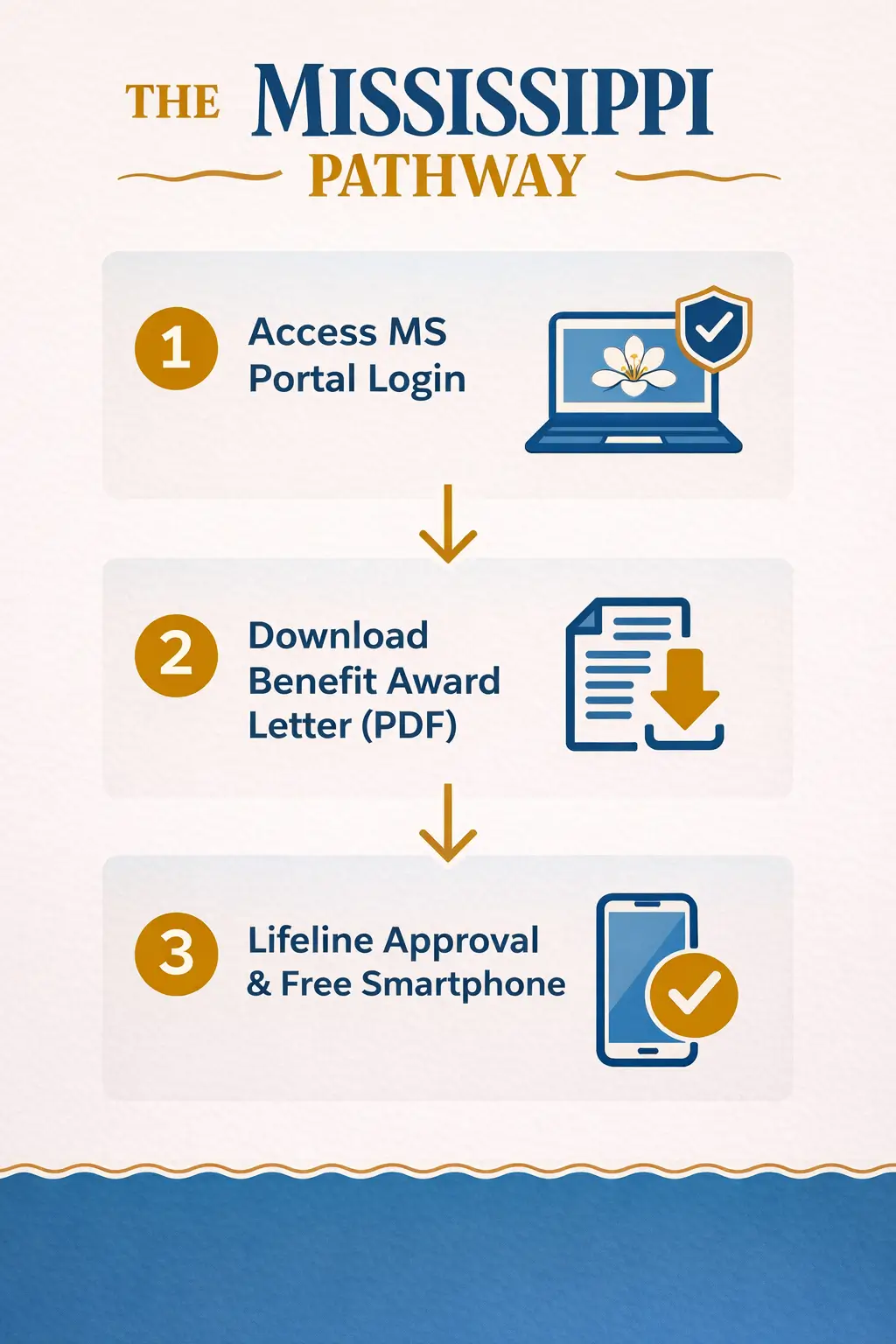
Most delays come from documents, not from the basic program rules. Keep this part simple to ensure your digital assistance application passes the automated checks.
- Use a current document that shows your name, the program name, the issuing agency, and a date within the last 12 months or a future expiration date.
- Good proof examples include a benefit award letter, approval letter, statement of benefits, or benefit verification letter.
- If your address does not verify, the Lifeline application uses a mapping tool to help USAC find your physical address. For Tribal lands, coordinates may be required.
- If another person at your address already has Lifeline, be ready for the Household Worksheet.
- Avoid blurry, cropped, or old screenshots. Manual review goes faster when the document is clean and current. That is an evidence-based practical takeaway from USAC’s documentation rules.
FAQs
What should I start with first?
Start with Lifeline. It is the main active federal affordability program for phone and internet help in 2026.
Can I keep my current number?
Usually yes. Most Lifeline carriers support number transfer during signup. Do not cancel your old service yourself until the transfer is complete. This is a practical enrollment rule based on how porting normally works with carrier-led activation.
What if my address is rural or hard to verify?
Use the mapping tool in the Lifeline application. USAC specifically says the application can use a mapping tool to help find a physical address, and coordinates may be required on Tribal lands.
Can a nonprofit give me a government phone directly?
Usually no. Nonprofits can help with computers, tablets, hotspots, digital skills, and low-cost internet, but the actual Lifeline benefit still has to come through a participating Lifeline provider.
What if I only need paperwork help?
Use a current benefits document, not an old screenshot. If needed, use the MDHS upload portal, contact Medicaid, or go to a library branch that offers scanning and printing.
Moving Out of Mississippi?
If you are relocating, make sure your benefits transfer smoothly by checking our guides for neighboring states:
Louisiana,
Alabama,
Tennessee, and
Florida.
Conclusion
For Mississippi residents in 2026, Lifeline is still the base program. Then come the support layers: school-issued devices for some students, VA tablet access for some veterans, disability-focused technology support in Mississippi, and nonprofit programs that can help with hardware when a phone plan alone is not enough.
Stop paying for a bill the government will cover, log into the Access MS portal, get your PDF letter, and secure your 2026 benefit today.