Alabama Wireless Benefit Guide: Free iPhone & MyDHR Perks
Alabama is a place of deep tradition, but our state benefit portals are anything but simple. Whether you are a student at Auburn, a veteran in Mobile, or a senior in Birmingham, having a reliable smartphone in 2026 is essential for safety. For updates, coverage insights, and Alabama-first help, start with valid wireless as part of your Yellowhammer State digital aid plan.
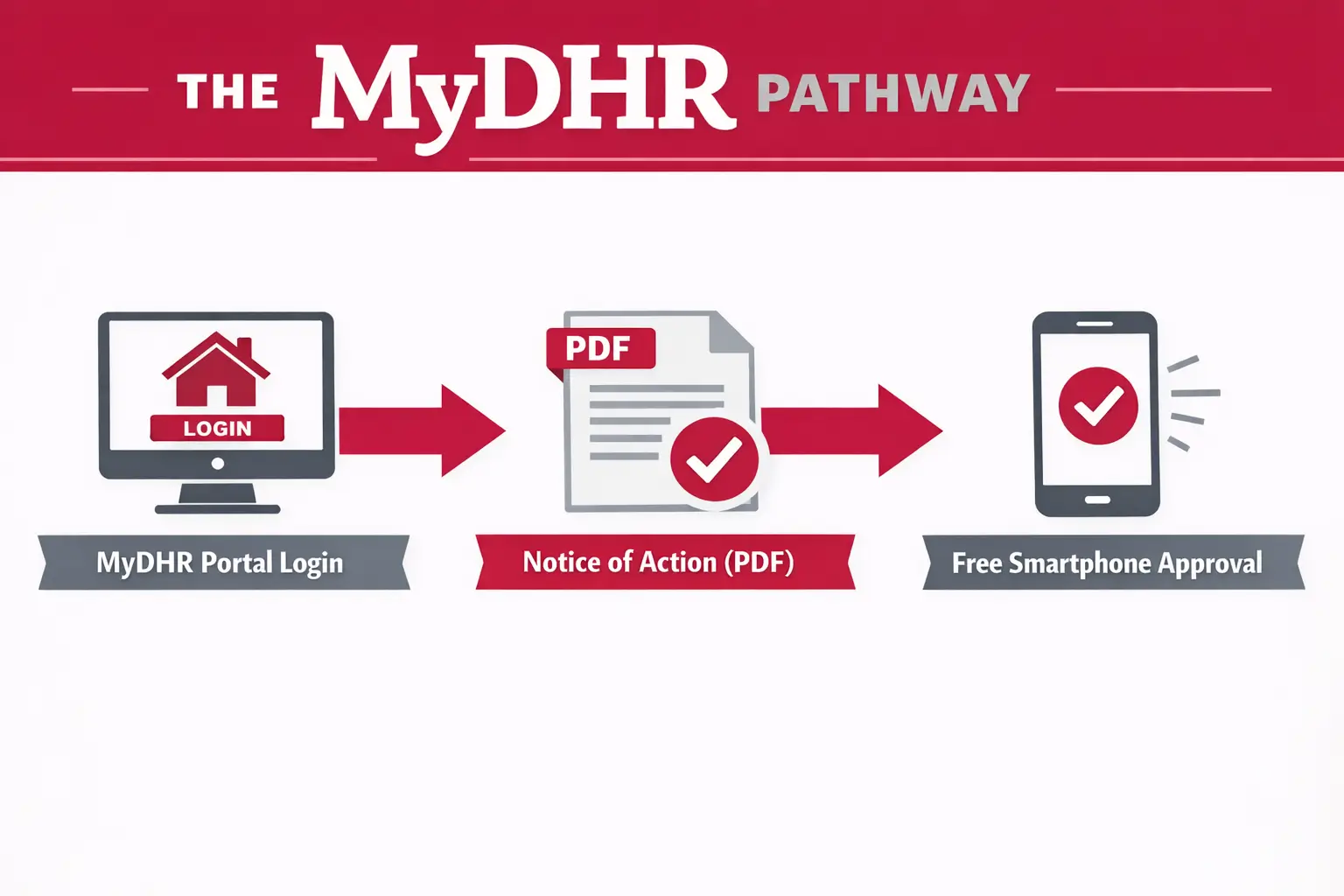
Alabama’s Lifeline program is your way to get a free government iPhone. But wait. You have to know how to navigate the MyDHR system to avoid getting stuck in the Pending cycle, especially when your MyDHR portal benefit proof is the document that decides the outcome.
Who Qualifies in 2026?
To get a free device or the monthly discount, you must pass one of these two tests. Most people qualify through a program they already use, but you can also pass based on your paycheck.
The Income Test (135% of Poverty Line)
If your total household income is at or below these numbers for 2026, you qualify.
- 1 Person: $21,128
- 2 People: $28,553
- 3 People: $35,978
- 4 People: $43,403
The Program Participation
You automatically qualify if you (or someone you live with) use any of these:
- SNAP (Food Assistance)
- Medicaid
- SSI (Supplemental Security Income)
- Veterans Pension or Survivors Benefit
- Federal Public Housing Assistance
The Foundation: The Federal Lifeline Program
Federal Lifeline Program is a government-funded program that provides a monthly discount to help make phone and internet services more affordable. In 2026, the standard discount is $9.25 per month. This money pays for your monthly data, talk, and text, so your bill is $0. It’s simple.
The Rule: You may have only one Lifeline benefit per household. If you and a roommate apply without a Household Worksheet, the state will reject both applications immediately.
Alabama-Specific Programs: Your 2026 Guide
The standard federal programs are only the beginning. In Alabama, we have specific state-funded shortcuts and hidden programs that can get you a high-quality device months faster than the national queue.
Programs for the Disabled (ADRS)
If you have a disability, do not start with a standard phone provider. The Alabama Department of Rehabilitation Services (ADRS) runs specialized tech programs.
APTAT (Accessing Potential Through Assistive Technology)
This ADRS assistive technology loan program loans specialized tech, including smartphones and tablets pre-loaded with accessibility apps for vision, hearing, or mobility.
- The Catch: You must work through an ADRS counselor to get the best equipment.
- Action Step: Call 1-800-671-6837 and ask for a Technology Demonstration. It is best to view the device in person at the Lakeshore facility before signing the loan documents.
- Link: Alabama APTAT Official Site
Programs for Seniors (ADSS)
Managed by the Alabama Department of Senior Services (ADSS), these programs are designed for homebound seniors and their caregivers.
Ageless Access Digital Navigation
In 2026, Alabama launched this initiative to provide Principal Digital Navigators. These are real people who will sit with you and handle the tech side of the application.
Alabama CARES
This program offers Supplemental Services, which include assistive technology and devices for caregivers and seniors.
- Action Step: If the federal website is too confusing, call 1-800-AGE-LINE. Ask for a Digital Navigator in your region.
Programs for Students (Pell Grants)
If you are a student at UA, Auburn, UAB, or Alabama State, your Pell Grant is your ticket to a free 5G device.
- The Secret: The most common reason students get rejected is uploading a “class schedule” by mistake.
- The Fix: You must download the official Financial Aid Award Letter from your school’s portal. It must clearly show the words “Federal Pell Grant” and the 2025-2026 academic year.
- Link: FAFSA / Federal Student Aid
Tribal Benefits (Poarch Band of Creek Indians)
If you live on recognized Tribal lands in Alabama, your monthly subsidy is much higher, and the Poarch Creek tribal discount can change what device you can afford.
- You qualify for up to $34.25 off your monthly bill.
- The Device: This higher credit is the secret to getting a refurbished iPhone 11 or 12 for a minimal co-pay or even $0 during the 2026 holiday promotions.
- Link: Poarch Band of Creek Indians Community Services
Who Actually Has the iPhones in Alabama?
| Provider | Best For | Best 2026 Device | Plan Details |
|---|---|---|---|
| AirTalk Wireless | Birmingham / Mobile Stock (Subsidized 5G iPhone Birmingham interest is highest here) | iPhone 8 or XR | Unlimited Talk/Text + 10GB Data |
| SafeLink Wireless | Reliable Rural Coverage | iPhone 7 / 8 | Best signal in dead zones. |
| TruConnect | International Students | iPhone 8 / Pixel | Calls to 200+ Countries |
| Assurance | Medicaid Bundles | Free Android Phone | Direct link with Alabama DHR |
While service is $0/month, Free iPhones are typically older models, such as the 8 or XR. For a 5G device like an iPhone 12, expect a one-time co-pay of about $39.99. If you are trying to secure a subsidized 5G iPhone Birmingham upgrade, plan for that co-pay and keep your documentation clean.
Common Alabama Roadblocks
MyDHR Warning: Delays usually happen when your name, address, or document type does not match your MyDHR portal benefit record. Keep your uploads clear and consistent with your MyDHR profile.
Address Warning: Alabama applications are rejected quickly when a P.O. Box is used. Use a physical location and map pins if needed to prevent address mismatch issues.
- Match Your Details: Copy your name exactly as it appears on your MyDHR account.
- Provide Street Address: Use a physical location only; the state will reject any P.O. Box.
- Time Your Application: Submit on Thursday mornings when the MyDHR servers are most stable.
- Use Map Pins: Drop a pin on the application map if you lack a fixed street address.
- Check Photo Quality: Take clear, well-lit photos that show all four corners of your paperwork.
- Verify Letter Date: Only upload benefit award letters issued within the last 12 months.
- The EBT Block Friction: Alabama now blocks out-of-state EBT transactions by default. Use your Notice of Action PDF instead of a card photo to avoid security flags.
- Recertification Warning: Automated checks start February 16, 2026. Check your mail daily so you don’t lose your phone.
How to Apply
Apply and Eligibility Checker
Use this before you upload documents to reduce MyDHR portal benefit mismatches.
- Method 1: Go to LifelineSupport.org. Use your legal name exactly as it appears on your ID.
- Method 2: Start with the Alabama-focused provider reviews and requirements. For example, open the AirTalk review, enter your Alabama Zip Code, and upload your MyDHR Benefit Summary directly during the application steps.
- Method 3: Visit your local Alabama DHR County Office. They can print a fresh copy of your benefit letter so it isn’t blurry when you scan it.
FAQs
I already have a phone. Do I have to do anything in 2026?
Yes. You must recertify every year. If you ignore USAC’s email, your service will stop.
Can I switch companies if I find a better iPhone elsewhere?
You can switch anytime. Tell the new company to “transfer” your benefit. Don’t cancel your old service yourself first.
What happens if I don’t use the phone for a few weeks?
Use it or lose it. You must place a call or send a text every 30 days to keep your service active.
Is the service truly $0, or are there hidden fees in Alabama?
It depends. Some providers charge a small monthly e911 fee. Expect a one-time co-pay for any newer iPhone models.
Can I keep my current phone number?
Yes. Tell your new company you want to port your number. Do not cancel your old service yourself first.
Does this plan allow for a hotspot?
Most 2026 plans allow hotspots. Monitor your limit closely; streaming video will consume your 10GB very quickly.
Moving to a neighboring state?
If you move, your benefit can transfer, but your documents and state portals change. Use the neighboring guides in the Southern Loop:
- Tennessee Wireless Benefit Guide
- Georgia Wireless Benefit Guide
- Florida Wireless Benefit Guide
- Mississippi (if available)
Conclusion
Don’t let a bill you shouldn’t be paying eat into your grocery money. Whether you are navigating the job market in Mobile or attending classes in Auburn, a free smartphone is your bridge to the resources you need.
Take Action Now: Log in to your MyDHR Account to get your proof, then visit LifelineSupport.org to secure your free iPhone today!